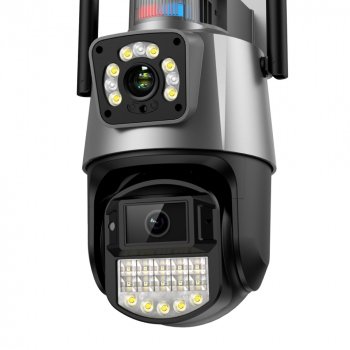
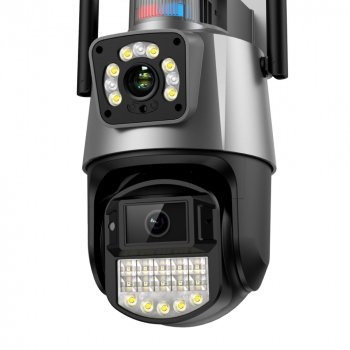
A dual-lens PTZ WiFi security camera blends wide-area monitoring with a closer, detail-focused view—then adds auto tracking to keep motion centered as it moves. When AI-based detection is set up well, it can help reduce missed moments and cut down on “nothing happened” alerts, especially in active areas like driveways, porches, and patios.
What Makes a Dual-Lens PTZ Camera Different
Traditional fixed cameras capture what stays inside a single frame. A dual-lens PTZ model is built to do more: keep broad awareness while also pulling detail from the most important area in real time.
- Dual-lens visibility: One lens can maintain a wider overview while the second provides a tighter angle for identifying faces, packages, or vehicle details.
- PTZ coverage: Pan, tilt, and zoom help cover corners, entrances, or large indoor spaces with fewer cameras, which can simplify wiring and placement.
- Auto tracking: Once motion is detected, the camera can follow a moving person or vehicle to reduce “out of frame” events.
- 4K resolution: Higher resolution can improve recognition of faces, plates, and small objects—especially when the camera is mounted at a practical height and lighting is controlled.
Key Features to Look For in Daily Use
On paper, many cameras sound similar. Day-to-day satisfaction usually comes down to how tracking behaves, how alerts are filtered, and how reliable your WiFi connection is at the mounting point.
Feature checklist for setup planning
| Feature |
Why it matters |
Quick setup tip |
| PTZ coverage |
Reduces blind spots by rotating to follow action |
Mount where the camera can rotate without obstructions (eaves, posts, gutters) |
| Dual lens viewing |
Pairs wide monitoring with detail capture |
Aim the wide view at the whole area; reserve tight view for entry points |
| AI detection |
Cuts nuisance notifications |
Enable person/vehicle alerts first, then add other categories only if needed |
| Auto tracking |
Keeps moving subjects in frame |
Define activity zones to prevent tracking traffic outside the property line |
| Night vision/low-light |
Improves usable footage after dark |
Avoid pointing directly at bright lights; reposition to reduce glare |
Also consider the practical details that affect everyday use:
- Tracking behavior: Look for fast lock-on, smooth follow-through, and sensible re-centering after tracking ends. If your area has frequent motion (cars, pedestrians), the ability to control tracking boundaries is critical.
- AI filtering options: Person/vehicle/pet categories can help reduce alerts triggered by shadows, rain, or tree movement.
- Night performance: The most useful night video comes from balanced exposure—clear subject detail without headlights or porch lights blowing out the entire frame.
- Two-way audio: Helpful for deliveries, visitors, and deterrence—especially when paired with audible warnings.
- WiFi stability: A strong signal at the mount location prevents lag, dropped frames, and delayed notifications.
Best Places to Install for Clear Tracking
Auto tracking is most effective when the camera has a clear path to follow movement and enough distance to keep the subject in view without constantly hitting rotation limits.
Getting Cleaner Alerts with AI Detection and Zones
Video Quality and Night Recording Tips
- Mount height matters: Too high reduces facial detail; too low invites tampering. Choose a balanced height with a clear angle toward faces and door-level activity.
- Avoid backlighting: If possible, position the camera so a strong light source isn’t directly behind the subject (for example, the setting sun or bright streetlights in the background).
- Keep lenses clean: Dust, pollen, and water spots can create haze and glare that looks worse at night than during the day.
- Verify WiFi at the exact install spot: Weak signal can force lower quality streams or cause delayed alerts. For practical WiFi guidance, the FCC’s home network tips are a solid reference: https://www.fcc.gov/consumers/guides/home-wi-fi-networks.
- Confirm recording settings: If you use local storage or cloud recording, check resolution, frame rate, and event clip length so important moments aren’t cut off.
Common Scenarios Where Auto Tracking Helps
Privacy, Security, and Responsible Placement
- Respect boundaries: Point the camera toward your owned property and avoid neighbors’ windows or private spaces.
- Harden account access: Use strong, unique passwords and enable any available protections in the camera app. Practical security checklists can be found via the EFF’s guidance: https://ssd.eff.org/.
- Update firmware and apps: Updates often address security issues and improve detection and stability. For a broader view of baseline capabilities expected in IoT security, see NISTIR 8259A: https://csrc.nist.gov/publications/detail/nistir/8259a/final.
- Check audio rules locally: If audio recording is enabled, confirm local consent and notice requirements where applicable.
Product Snapshot
Quick purchase reference
More In-Stock Picks
FAQ
Does auto tracking work at night?
It can, as long as the camera has usable night video with enough contrast to “see” the moving subject. Performance improves when glare is minimized (avoid pointing at bright lights) and the lens stays clean.
How can false alerts be reduced with AI detection?
Enable person detection first, then add vehicle detection if needed, and set activity zones to block streets, sidewalks, and moving foliage. Reduce sensitivity step-by-step and limit tracking boundaries so the camera doesn’t chase irrelevant motion.
Where should a PTZ camera be mounted for the best coverage?
Mount it where it can rotate freely without obstructions, with a clear angle toward faces and vehicles, and a strong WiFi signal at the exact mounting location. Doorways, driveways, patios, garages, and side access paths are common placements that benefit from PTZ tracking.
Recommended for you









Leave a comment